
Sapling AI Detector
Sapling AI Detector checks text, PDFs, and DOCX files for likely AI writing, with web, extension, and API access.
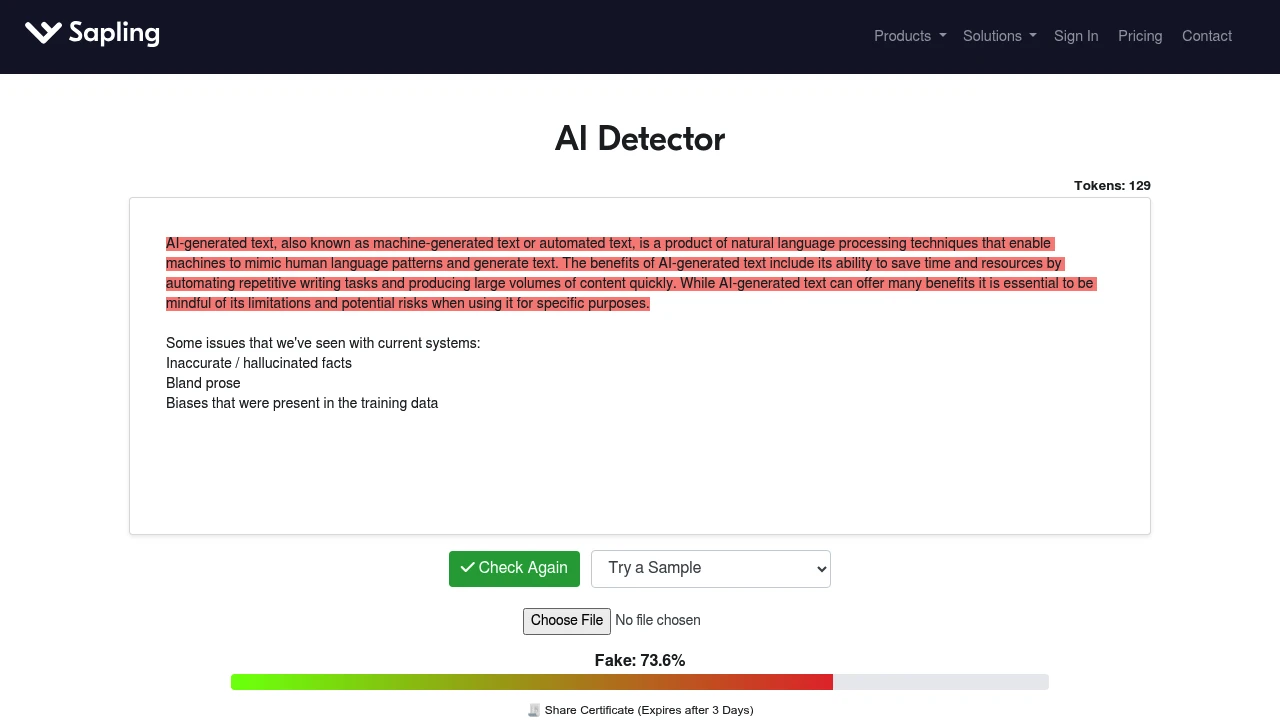
Sapling AI Detector is a free checker for pasted text, PDFs, and Word documents. It serves educators, SEO practitioners, content moderators, and teams that need an early signal before review. The tool returns an overall probability, highlights likely AI sentences, and warns that no detector should be treated as proof.
Key Highlights
- Checks pasted text plus PDF and DOCX uploads
- Shows an overall AI-generated probability with highlighted sections
- Adds sentence-level perplexity scores for generic or simplistic text
- Browser extension runs detection on selected web and chatbot text
- AI detector API access supports automated or high-volume workflows
- Updated for GPT-5, Claude 4.5, Gemini 2.5, Qwen3, and DeepSeek-V3
What Makes It Different
Sapling explains the result as a review aid, not a final verdict. A Transformer-based classifier estimates whether each token is AI-generated, then pairs the full-text score with sentence-level perplexity.
On longer-text benchmarks, the vendor reports 97%+ detection of AI-generated content and less than 3% false positives for human-written content. Sapling also says shorter, more general, or essay-like writing can trigger false positives, so human review still matters.
Features & Capabilities
The main workflow is simple: paste text into the editor or upload a PDF or DOCX file, then review the score and highlights. Sapling says accuracy improves after roughly 50 words. Free users can query up to 2,000 characters at a time, while Pro and Enterprise subscribers can paste up to 100,000 characters.
The browser extension adds a Detect AI button for selected text on other websites, including chatbot pages, and lets users edit the analyzed text and recheck it. For repeat checks, Sapling points to API documentation and enterprise plans for high-volume uses such as resume screening.
User Ratings and Testimonials
Sapling does not publish a public rating score or customer testimonials. Treat its accuracy claims as vendor-side claims. Sapling's own caveat is clear: false positives and false negatives can occur.
That caveat matters for schools, hiring teams, and publishers. Sapling is useful for a documented screening pass, but not as the only basis for accusing a writer or rejecting a submission.
Pricing & Value
- Free: $0/month, with the web detector and free queries up to 2,000 characters per query
- Pro: $25/month for individuals, with a free 1-month trial and longer detector queries up to 100,000 characters
- Enterprise: Contact sales, starts at 10 seats at $15/seat/month for teams
- API: Metered pricing for developers, listed separately from the seat-based plans
The free plan is enough for spot checks. Pro covers longer queries and Sapling's broader writing features, while API and Enterprise fit repeat detection workflows.
FAQs
Sapling reports 97%+ detection and under 3% false positives on longer-text benchmarks, but says false positives and false negatives can occur.

You might also like
 bisibility — Free beta: Track your website’s keywords, Google rankings, Search Console insights, and share of voice.

